Timeframes
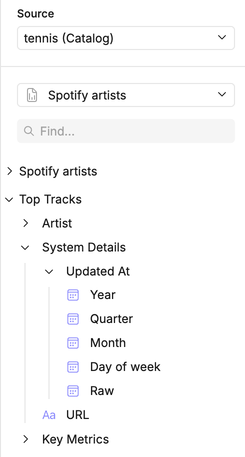
For date fields, you can provide multiple timeframe options directly within the View YAML.
Instead of requiring stakeholders to manipulate dates manually, you can pre-define useful breakouts like year, month, or day.
Loading code...
Here’s a quick reference of all the timeframe options you can use, with explanations for each one.
| Option | Description |
|---|---|
| yeartrunc | Rounds down to the first day of the year |
| quartertrunc | Rounds down to the first day of the quarter |
| monthtrunc | Rounds down to the first day of the month |
| weektrunc | Rounds down to the first day of the week |
| daytrunc | Rounds down to midnight of that day |
| hourtrunc | Rounds down to the start of the hour |
| minutetrunc | Rounds down to the start of the minute |
| secondtrunc | Rounds down to the start of the second |
| year | Extracts the year component |
| quarter | Extracts the quarter (1-4) of the year |
| month | Extracts the month (1-12) of the year |
| week | Extracts the week (1-52) of the year |
| dayofyear | Extracts the day (1-366) of the year |
| dayofmonth | Extracts the day (1-31) of the month |
| dayofweek | Extracts the day (0-6) of the week |
| hour | Extracts the hour (0-23) of the day |
| minute | Extracts the minute (0-59) of the hour |
| second | Extracts the second (0-59) of the minute |
| null | No function is applied |
In the canvas UI, timeframes options are revealed by clicking on the expandable field.