Aggregates
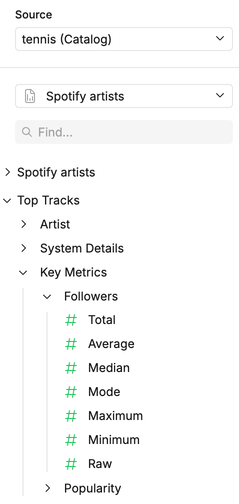
Instead of requiring users to write manual calculations every time, you can define a set of aggregations directly within your View YAML. This allows stakeholders to choose from multiple summary options—like sum, average, or count—with just a click.
Loading code...
Here’s a quick reference of all the aggregate options you can use, with explanations for each one.
| Option | Description |
|---|---|
| count | Returns the total number of rows (including duplicates and non-nulls) |
| countdistinct | Returns the number of unique non-null values |
| sum | Returns the total sum of numeric values |
| avg | Returns the average (mean) of numeric values |
| median | Returns the median (50th percentile) of numeric values |
| mode | Returns the most frequently occurring value |
| max | Returns the maximum value |
| min | Returns the minimum value |
| stddevpop | Returns the population standard deviation |
| stddevsamp | Returns the sample standard deviation |
| varpop | Returns the population variance |
| varsamp | Returns the sample variance |
| null | No function is applied |
In the canvas UI, aggregate options are revealed by clicking on the expandable field.