🚀 Announcing the Count Agent. Learn more or join us for a live demo, 22 Jan. ✨
Pricing
Sign InGet Started

Data exploration and problem solving

  • From ad hoc analysis to polished reports

Reference

  • Cells overview
  • SQL cells
    • Referencing other cells
    • Jinja templating
    • SQL formatting
  • Python cells
  • Visual and low-code cells
  • Control Cells
  • Local Cells
  • Import from other tools
  • Export code and results
  • Query Performance and Management
  1. Learn >
  2. Data exploration and problem solving >
  3. SQL cells >
  4. SQL formatting

SQL formatting

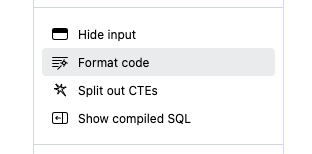
In the cell controls in the right-hand sidebar, you'll see an option to Format SQL. This will indent and add appropriate spacing to your query, based on the dialect of SQL for your database. (It won't edit capitalization.)
Loading...
Next: Python cells →
Last updated: 03/12/25
Sound good?

Count is the best way to explore data and solve problems for teams and organizations.

Get started for free
© 2025 Count Technologies Ltd. All rights reserved.
Privacy PolicyTerms of UseCookies PolicyConsent preferences