Customizing Datasets
Datasets are a collection of views and the information about the relationships between them. These make up the tables that users see when constructing queries from the semantic layer.
Schema
The schema displays a list of available customization options you can use in the dataset YAML file.
| name | The name of the dataset. This must be unique within the catalog. Defaults to the file name. Optional. |
|---|---|
| label | A user-friendly label for the dataset. This is what is displayed in the UI, and defaults to the name. Optional. |
| description | A description of the dataset. Optional. |
| extends | Specify another dataset file to extend with a different name, modified properties, or additional views/joins. Optional. |
| extends.path | Path to the dataset file to extend. |
| extends.dataset | Name of the dataset to extend (only relevant for LookML explores and models). |
| extends.omit_properties | Any properties from the base dataset to omit from the new dataset. Optional. |
| extends.omit_views | Any views from the base dataset to omit from the new dataset (reference by view name). Optional. |
| extends.omit_joins | Any joins from the base dataset to omit from the new dataset (reference joins by view name). Optional. |
| from | The name of the base view of the dataset. Only supported when \views\ is not specified. |
| join | A list of joins that are applied to the base view. Only supported when \views\ is not specified. Optional. |
| join[*].view | The name of the view that is being joined to the base view. |
| join[*].constraint | The condition that the join is made on. This is defined in the dialect detailed here. |
| join[*].relationship | The relationship between the base view and the joined view. This can be one of one_to_one, one_to_many, many_to_one or many_to_many. |
| join[*].type | The type of join. This can be one of inner, left, right, or full. Optional. |
| join[*].alias | The alias to use for the joined view. Optional. |
| join[*].label | A user-friendly label to use for the joined view. Defaults to the view's label. Optional. |
| views | The list of views that are included in the dataset. Optional. |
| views[*].name | The name of the view that is being included in the dataset. |
Example uses
A full YAML example
name: spotify_artists
label: Artists

from: spotify_artists

join:
  - view: spotify_tracks
    constraint: spotify_tracks.artist_id = spotify_artists.artist_id
    relationship: one_to_many

  - view: spotify_daily_tracks
    constraint: spotify_daily_tracks.track_id = spotify_tracks.track_id
    relationship: one_to_many

  - view: spotify_genres
    constraint: spotify_genres.artist_id = spotify_tracks.artist_id
    relationship: many_to_many
Using name, description and label
name: matches_and_players
label: Matches and Players
description: Match summary data with player attributes for both winners and losers of each match.- Choose a system name and a user friendly label for your dataset. The system name must be unique among the datasets of this catalog.
- You have more freedom in your choice of label, but keep in mind that datasets with similar or the same label may be confusing for your catalog users.
- Dataset descriptions will appear in the catalog homepage.
Using join
join:
  - view: players
    alias: winners
    label: Winners
    constraint: winners.player_id=matches.winner_id
    relationship: many_to_one

  - view: players
    alias: losers
    label: Losers
    constraint: losers.player_id=matches.loser_id
    relationship: many_to_one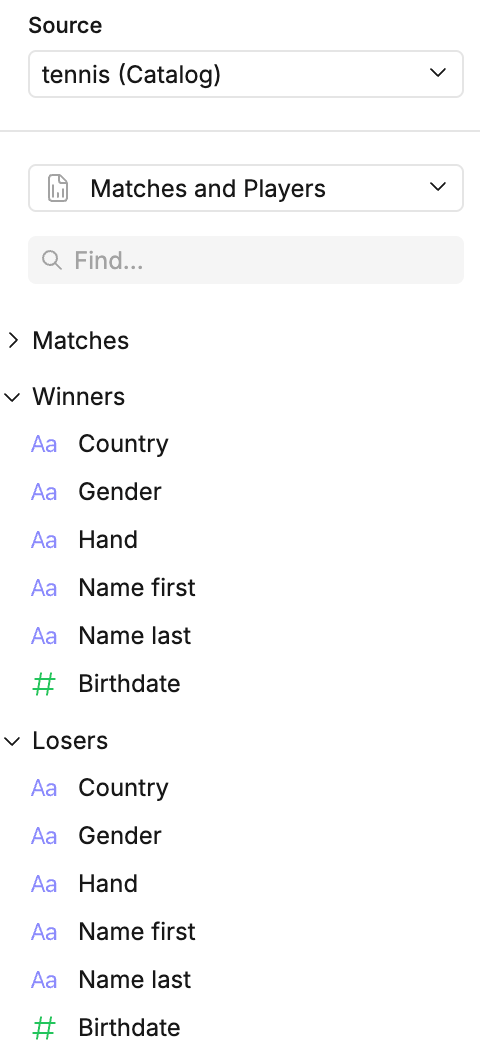
relationshipcontains the cardinality of the relationship between the views being joined.- Join
typecan be any one of:left,right,inner, orfull - Defining multiple joins in a dataset is as simple as adding an additional view to the join list.