Row-level security: Identity-Aware Reports
Identity-Aware Reports let you share a single canvas with many people and have each person see only the rows they're allowed to see - row-level security, defined and enforced in Count. You write the rule once, in SQL, using the viewer's email, and Count recompiles the query for whoever opens the canvas.
Enterprise feature
Identity-Aware Reports are an Enterprise feature. Please speak to a member of the Count team to discuss enabling them for your workspace.
#How it works
Two attributes are available in the `count` Jinja namespace in SQL cells:
| Attribute | Renders as |
|---|---|
count.user_email | The email of the person running the query, as a SQL string literal ('jane@example.com'). NULL when the canvas is unlocked. |
count.is_locked | true when the canvas is locked, false when it's unlocked. |
count.user_email is already quoted and escaped for you - don't wrap it in quotes.
Because the values differ per viewer, each viewer gets their own compiled query and their own cached result. Nobody sees another viewer's cached rows.
#Why locking matters
Identity-Aware Reports only resolve an identity on a locked canvas. On an unlocked canvas count.user_email is NULL for everyone, so that editors don't each get a different result while working on the canvas together, and so that the result cache stays shared.
Locking is also what makes the rule enforceable: viewers of a locked canvas can't edit the SQL, so they can't remove the filter.
#Writing an identity-aware query
Filter in the SQL cell that queries your database, so the database only ever returns the permitted rows:
SELECT *
FROM user_details
WHERE email = {{ count.user_email if count.is_locked else 'fallback@example.com' }}
For a permissions table that lists who may see each row:
SELECT *
FROM `your_project.your_dataset.orders`
WHERE {{ count.user_email if count.is_locked else 'fallback@example.com' }} IN UNNEST(permitted_users)
The if count.is_locked else ... fallback controls what editors see while the canvas is unlocked. Pick it deliberately:
- a placeholder email → editors see one representative viewer's slice
- a literal that matches nothing → editors see an empty result and build against the shape only
Use Show compiled SQL on the cell to check what actually runs.
Filter in remote database queries
Put the identity-aware filter in the cell that queries your database - not downstream of it.
A remote database cell sends its query to your warehouse, so unpermitted rows never reach the browser. If you instead load the full table and then filter it in a local cell, a Python cell, or a visual's filters, the complete dataset has already been fetched to the canvas and is available to anyone with access to it.
The same applies to hiding results visually. Hidden frames, locked objects, and off-screen cells are presentation tools, not security controls - they don't stop someone with canvas access from reaching the underlying data.
#Restricting viewer access
Because the filter only applies while the canvas is locked, you must stop viewers from opening it unlocked. Turn on Only accessible when locked in the canvas's Document settings (right sidebar, analysts only).
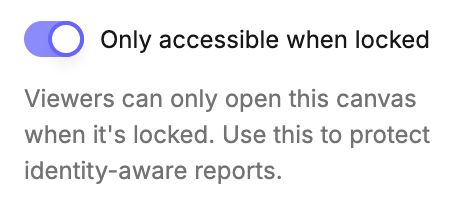
With it on, anyone without edit access is denied access to the canvas entirely while it is unlocked. Editors and analysts are unaffected.
If a cell uses count.user_email and this setting is off, Count shows a Viewer access not restricted warning on the cell. Treat that warning as a blocker - until it's resolved, any viewer can open the unlocked canvas and see unfiltered results.
#Checklist for a secure report
1. The filter lives in the SQL cell that queries the database, not in a downstream local / Python / visual filter.
2. Every cell that exposes restricted data is filtered - including cells feeding other cells.
3. Only accessible when locked is on, and no cell shows the "Viewer access not restricted" warning.
4. The canvas is locked before you share it.
5. You've verified the result as a viewer (a test account in your permissions table, or the permissions preview) - not just as an analyst.
#Limitations
- Locked canvases only - Unlocked,
count.user_emailisNULL. - Rules are defined in Count, not your warehouse - Queries still run through your connection's shared credentials, so warehouse-side row-level policies attached to individual users don't apply.
- No identity outside a signed-in session - Shared links, embedded canvases, and anything running as a service account have no user email, so
count.user_emailrendersNULL. Use signed-in workspace access for identity-aware reports. - SQL cells only -
countisn't available in catalog files, and catalogs don't support Jinja templating. - Email only - Custom user attributes and group-based rules aren't supported yet.
- The AI agent is disabled on locked canvases, so viewers can't use it to query around the filter.
Last updated: 03/08/26