AI Agent Overview
Count AI isn't a chatbot bolted onto your data. It's an agent that investigates a question the way an analyst would, on a platform governed, transparent and auditable enough to let that happen at scale, working alongside your team rather than in a private chat window.
Ask it a question in plain English and it gets to work in your canvas: writing queries, checking its results, and building the charts and tables you need.
You don't need to know SQL, and you don't need to know where the data lives.
Every query it runs and cell it creates is a normal, editable object in the canvas, so you can open it up, see how it reached an answer, and fix it if something's off.
#The wider harness
Count AI works by drawing on every part of Count:
- Data sources: it can query your warehouse, uploaded files, and any connected business apps or the web, quantitative and qualitative alike, so an answer can be checked against more than one kind of source rather than resting on a single query. Data sources
- Context: it reads the skills and context you've set at the workspace, source or project level, plus your Count Metrics semantic layer, so it's working from your business logic rather than guessing at it. Build trusted context.
- Analytics engine: its queries run on Count's own compute layer, so it can dig as deep as it needs without adding to your warehouse bill.
- Integrations: reachable from Slack, the API, or agentic tools like Claude and Cursor, so a question gets the same answer wherever it's asked. Integrating Count.
- Presentation: its output can become a live report or a shared canvas, not just an answer in a chat window. Reports and alerts.
- Governance: auditing works two ways. Telemetry gives admins a workspace-wide view of what agents are doing, and canvas lineage lets anyone trace a specific piece of analysis themselves.
#Who's it for
Analysts use it to skip the repetitive work and get to the interesting part faster. It drafts the query you were about to write, gives you a first pass at the answer, and leaves you time for the work that actually needs a person.
Everyone else (product, growth, finance, ops) uses it to ask a question in plain language and get an answer built on the same governed data your analysts use. That means it's something an analyst can check, rather than something they have to redo.
#What to ask it
The value of the agent is found in asking it to dig into real business questions and challenges:
- When something's off: "Margins are down but sales are up, why?" Hand it a vague worry and it breaks the problem into testable pieces, rather than asking you to be more specific before it'll help.
- When you've inherited someone else's SQL: paste it in and ask for a walkthrough. It splits it into steps, explains what each one's doing, and points out the bit that looks wrong.
- When you don't know where to start: "Help us understand churn risk" is a perfectly good prompt on its own. It decides what's worth investigating and shows its thinking as it goes.
- When one question isn't enough: it can spin up sub-agents to chase several threads at once, then bring the findings back together, so you don't need to break the problem down yourself.
In this video, Chas uses the Count agent to turn a hunch about rising churn into a prioritised six-week product roadmap to reverse it.
#Enabling Count AI
Count AI is disabled by default for workspaces created before November 17, 2025.
To enable Count AI:
- Go to workspace settings (you'll need Owner permissions)
- Navigate to the "AI" tab
- Toggle the "Enable AI" setting on
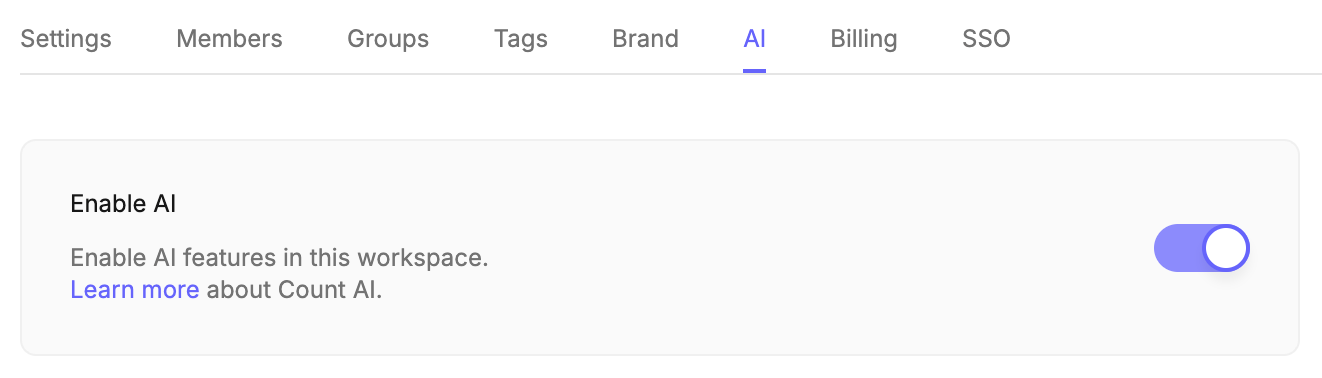
Once enabled, any analyst in a canvas can use the AI agent. Owners can disable it at any time, which immediately removes access for all workspace members, though any content produced by AI agents will persist.
#How Count's AI agent works
Count AI creates and edits cells in your canvas. These may reference:
- Catalogs
- Databases
- Data connections via MCP
- Other cells
- CSV files uploaded to the canvas
- Information from the web
Important: The agent does not execute queries directly against your database unless the user gives explicit approval.
#Privacy and security
- GDPR compliant - Count AI meets European data protection standards
- No model training - Neither Count nor our partners (OpenAI, Google, Anthropic) train models on your data
- SOC 2 accredited - Built on Count's secure platform
- Controlled access - Count AI can only access metadata (column names, types, descriptions) from databases without your pa and row-level data from cells in the canvas
Learn more in our Terms of Use and Security pages.
#Important notes on accuracy
Count AI uses artificial intelligence that may produce inaccurate or misleading outputs. Always verify results before making decisions or taking action. AI outputs are not facts and shouldn't replace expert judgment.
Last updated: 23/09/26