Groups
The Groups tab allows workspace owners and admins to manage groups of workspace members.
Groups are a convenient way to manage common permissions for a set of users. For example, groups can be assigned roles in projects, or permissions on canvases and reports.
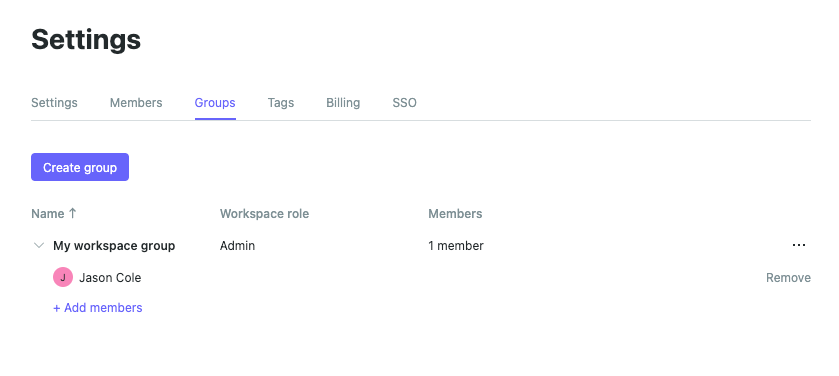
#Create a group
When creating a new group, you may assign the following options:
• Name - the public name of the group displayed to other workspace members
• Workspace role (optional) - members of this group will be assigned this workspace role (if it is higher than their individual workspace role).
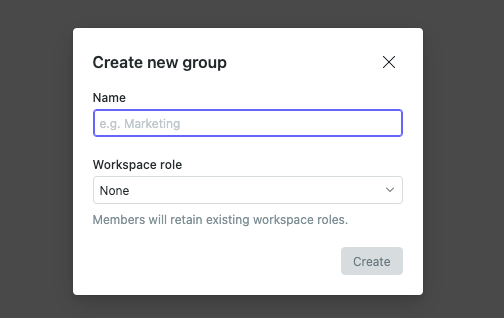
#Add group members
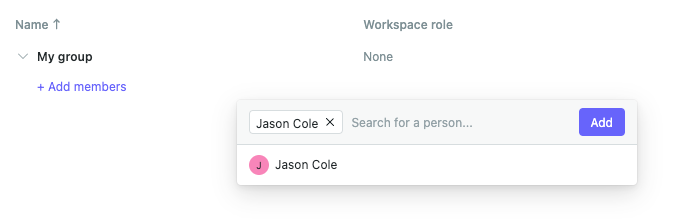
To add members to an existing group, expand it and select Add members:
Info
Workspace guests cannot be assigned to groups, so will not appear in this list.
#Delete a group
If a group is deleted, all group members remain members of the workspace, but:
• Any workspace roles conferred on those users due to their group membership expire.
• Any permissions assigned to those users due to their group membership cease to take effect.
Therefore you should be aware that while group deletion is a non-destructive operation, it may cause changes to permissions for group members that you do not expect.
Last updated: 24/07/26